“`html
Small Business SEO: 7 Ways to Improve Local Rankings
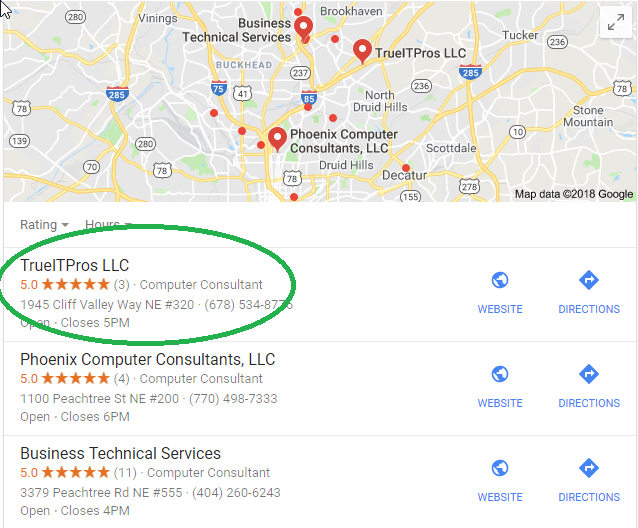
Small business SEO helps your company appear when potential customers search for the services you provide. For an Atlanta business, that may mean showing up for searches that include your service, industry, neighborhood, or city.
SEO can seem highly technical. However, many of the most important improvements begin with clear business information, useful content, customer reviews, a mobile-friendly website, and a well-organized site.
There are no shortcuts that guarantee a first-page ranking. Old tactics such as keyword stuffing, hidden text, copied content, and misleading pages can hurt visibility. A stronger approach is to make your website helpful for customers and easy for search engines to understand.
Small business SEO is the process of improving your website, local business information, content, and online reputation so customers can find your company through search engines.
What Does Small Business SEO Include?
Small business SEO includes both website improvements and activities that happen on other trusted platforms. The goal is to help search engines understand who you are, what you offer, where you operate, and why your information is useful.
A practical SEO strategy usually includes:
- Accurate local business listings
- Service pages that answer customer questions
- Educational blog content
- Customer reviews and owner responses
- Fast, mobile-friendly website pages
- HTTPS website security
- Clear navigation and internal links
- Performance tracking through search tools
Google recommends creating helpful, reliable content for people while making important page details clear to search engines. You can review the official Google Search Essentials for more information.
1. Build a Complete Local Search Presence
A complete local presence helps search engines connect your company with its services and geographic area. Start with the platforms that customers are most likely to use.
Start With Your Google Business Profile
Google Business Profile, previously called Google My Business, allows a company to manage information that may appear in Google Search and Maps.
Review your profile and complete important fields such as:
- Business name
- Primary and secondary categories
- Address or service area
- Phone number
- Website address
- Business hours
- Services and business description
- Current photos
Google explains that local results are mainly based on relevance, distance, and prominence. Complete and accurate information can help Google understand when a business is relevant to a local search. Read Google’s local ranking guidance for more details.
Keep Your Information Consistent
Your business name, address, phone number, hours, and website should be consistent across major directories. Conflicting details can confuse customers and make it harder for platforms to confirm your information.
Consider reputable platforms such as Google Business Profile, Bing Places, Yelp, local chambers of commerce, and directories related to your industry. Avoid submitting your company to hundreds of low-quality directories simply to create links.
For example, an Atlanta veterinary practice may benefit more from a complete Google Business Profile and a respected veterinary directory than from dozens of unrelated listing websites.
2. Publish Content That Answers Customer Questions
Useful content gives your website more opportunities to appear for the questions customers ask. It can also show that your company understands its services and the problems its customers face.
What Should a Small Business Blog About?
Write about topics that help customers make decisions. Each article should answer a clear question instead of repeating broad sales messages.
Useful topic formats include:
- How a service works
- What a customer should expect
- Common mistakes to avoid
- Questions to ask before hiring a provider
- Differences between two service options
- Local issues that affect Atlanta customers
- Simple checklists and planning guides
An accounting firm could explain how clients should prepare documents before tax season. A construction company could explain the steps involved in site preparation. A law firm could answer common questions about its consultation process without giving advice for a specific legal matter.
Quality Matters More Than a Fixed Publishing Schedule
There is no publishing frequency that guarantees better rankings. Two useful articles per month may be a realistic starting point for some businesses. Another business may publish once per month and still build a valuable resource library.
Choose a schedule your team can maintain. Each article should be accurate, original, easy to read, and connected to a real customer need.
After publishing, share a short summary on the social media platforms your customers use. Link the post back to your website so interested readers can access the full explanation.
3. Request and Respond to Customer Reviews
Customer reviews help potential buyers understand what it is like to work with your business. Reviews may also support local visibility by adding signals about a company’s reputation and prominence.
Create a simple process for requesting honest feedback. You may place your Google review link in a follow-up email, invoice message, email signature, or customer satisfaction workflow.
Google provides instructions for requesting customer reviews through a Business Profile.
Reviews Require Active Management
Respond to both positive and negative feedback in a professional way. A response shows that someone is paying attention and willing to address concerns.
Avoid sharing private customer information in a public response. This is especially important for healthcare, legal, financial, veterinary, and professional service organizations.
Do not purchase reviews or create fake customer accounts. Reviews should reflect genuine customer experiences.
4. Make Your Website Easy to Use on Mobile Devices
Your mobile website should provide the same useful information as the desktop version. Google uses the mobile version of a website’s content for indexing and ranking through mobile-first indexing.
A mobile visitor should be able to:
- Read the text without zooming
- Use menus and buttons easily
- Find the phone number and contact form
- View important images and service information
- Complete forms without layout problems
- Load pages without long delays
Google’s mobile-first indexing documentation explains how mobile content is used in Search.
Review Page Speed and Stability
Large images, outdated plugins, unnecessary scripts, weak hosting, and poorly built page templates can make a website feel slow or unstable.
Google’s Core Web Vitals measure parts of the real-world page experience, including loading performance, responsiveness, and visual stability. These measures should be reviewed as part of website maintenance, but they are not the only factors that affect search visibility.
Business owners can review the official Core Web Vitals guidance or ask a qualified website professional to examine performance issues.
5. Protect Your Website With HTTPS
HTTPS encrypts information exchanged between a visitor’s browser and your website. It also allows browsers to confirm that they are communicating with the expected website.
Without HTTPS, visitors may see a warning that the page is not secure. That warning can reduce trust, especially when a person is preparing to submit a contact form or enter account information.
Installing an SSL certificate is only one part of website protection. It does not replace software updates, backups, account security, malware monitoring, access controls, or broader Cybersecurity practices.
Check for Common HTTPS Problems
After enabling HTTPS, confirm that:
- HTTP pages redirect to the HTTPS version
- Images and scripts also load through HTTPS
- Internal links use the correct address
- The sitemap lists the HTTPS pages
- The certificate renews before it expires
- Contact forms continue to work
6. Improve Website Structure and Internal Links
A clear website structure helps visitors move from general information to specific services. It also helps search engines discover pages and understand how topics are connected.
A small business website may use a structure such as:
- Home
- About
- Main services
- Individual service pages
- Industries served
- Service areas
- Blog or resource center
- Contact
Give Each Important Service Its Own Page
Do not place every service in one short paragraph on the home page. A dedicated page gives you room to explain the service, who needs it, how the process works, and what the customer should do next.
For example, an Atlanta construction company may need separate pages for grading, excavation, land clearing, and site preparation. Each page should contain useful information rather than a slightly changed copy of the same paragraph.
Use Descriptive Internal Links
Link related articles and service pages together when the connection helps the reader. Use descriptive link text that explains what the destination page covers.
For example, an article about email security could link to a page explaining phishing protection. A guide about business continuity could link to information about backups and disaster recovery.
7. Measure Search Performance and Fix Problems
SEO decisions should be based on real search and website data. Tracking helps you see which pages attract visitors, which search terms create impressions, and where technical problems may be limiting performance.
Useful tools include:
- Google Search Console for Google search visibility, indexing, and page issues
- Bing Webmaster Tools for Bing indexing and search data
- Website analytics for traffic and visitor behavior
- Google Business Profile performance data for local interactions
- Form and phone tracking for qualified inquiries
Do Not Measure Success With Rankings Alone
A higher ranking is useful only when it attracts the right audience. A page with fewer visitors may create more business if those visitors need the exact service being offered.
Track business outcomes such as:
- Qualified contact form submissions
- Calls from potential customers
- Appointment requests
- Email inquiries
- Downloads or mailing list signups
- Visits to important service pages
A Simple Monthly SEO Checklist for Atlanta Businesses
A monthly review can help your company catch errors and maintain steady progress. Use this checklist as a starting point.
- Confirm that your business hours, phone number, and address are correct.
- Respond to new customer reviews.
- Review website forms and phone links.
- Check Search Console for indexing or security warnings.
- Review your most visited service and blog pages.
- Update one older page with clearer or more useful information.
- Test the website on a phone and desktop computer.
- Check for broken links, missing images, and outdated information.
- Plan the next article around a real customer question.
How Do SEO and Paid Search Work Together?
SEO builds long-term organic visibility, while paid search can place advertisements in front of selected audiences more quickly. They are separate strategies, but they can support each other.
Search advertising can reveal which search terms generate inquiries. That information may help a business plan service pages and educational content. Strong website pages can also give paid visitors a clearer explanation of the offer after they click an advertisement.
A small business should still track costs, lead quality, and conversions carefully. Traffic by itself does not prove that a campaign is profitable.
How Does Managed IT Support Your Online Presence?
SEO work depends on a reliable technology foundation. Website access, business email, employee accounts, secure devices, backups, and vendor coordination can all affect a company’s ability to manage its online presence.
Proactive managed IT can help an Atlanta business maintain the systems employees use to publish content, respond to customers, manage reviews, access analytics, and communicate with website providers.
An IT partner may also help identify issues such as compromised accounts, missing access documentation, unsupported computers, weak password practices, and unclear vendor responsibilities. These problems may not be traditional SEO tasks, but they can interrupt marketing work and create avoidable business risk.
Frequently Asked Questions About Small Business SEO
What Is the Best First Step for Small Business SEO?
Start by checking your website, Google Business Profile, service pages, contact information, and mobile experience. Fix inaccurate information and technical problems before publishing large amounts of new content.
How Long Does Small Business SEO Take?
SEO usually requires ongoing work rather than a one-time change. The timing depends on your market, competition, website condition, location, content quality, and the types of searches you are targeting.
How Often Should a Small Business Publish Blog Posts?
Choose a schedule that allows you to publish accurate and useful articles. One or two strong posts per month may be better than frequent posts that repeat basic information or do not answer customer questions.
Do Customer Reviews Improve Local SEO?
Reviews can support local visibility and help potential customers evaluate your company. Review count alone does not guarantee a top position because local results also depend on relevance, distance, prominence, and other signals.
Does HTTPS Guarantee Better Search Rankings?
No. HTTPS is an important security and trust measure, but it does not guarantee strong rankings. Your content, local relevance, website structure, usability, reputation, and technical condition also matter.
Build a Stronger Search Foundation for Your Business
Small business SEO starts with the basics. Keep your local information accurate. Publish content that answers real questions. Manage reviews. Improve the mobile experience. Protect the website with HTTPS. Organize pages clearly and measure meaningful results.
These steps will not create instant rankings. They can give your Atlanta business a clearer, more useful, and more reliable online presence that supports long-term search visibility.
To learn more about how trueITpros can help your business with the technology foundation behind small business SEO, contact us.
Related Content
- Why Email Security Matters for Atlanta SMBs
- What is a Managed IT Service Provider (MSP) & How Can It Help Your Business?
“`