“`html
Virtual Reality for Business: Uses and Security Risks
Virtual reality for business can help companies train employees, review designs, demonstrate products, and simulate situations that would be costly or difficult to recreate in the real world.
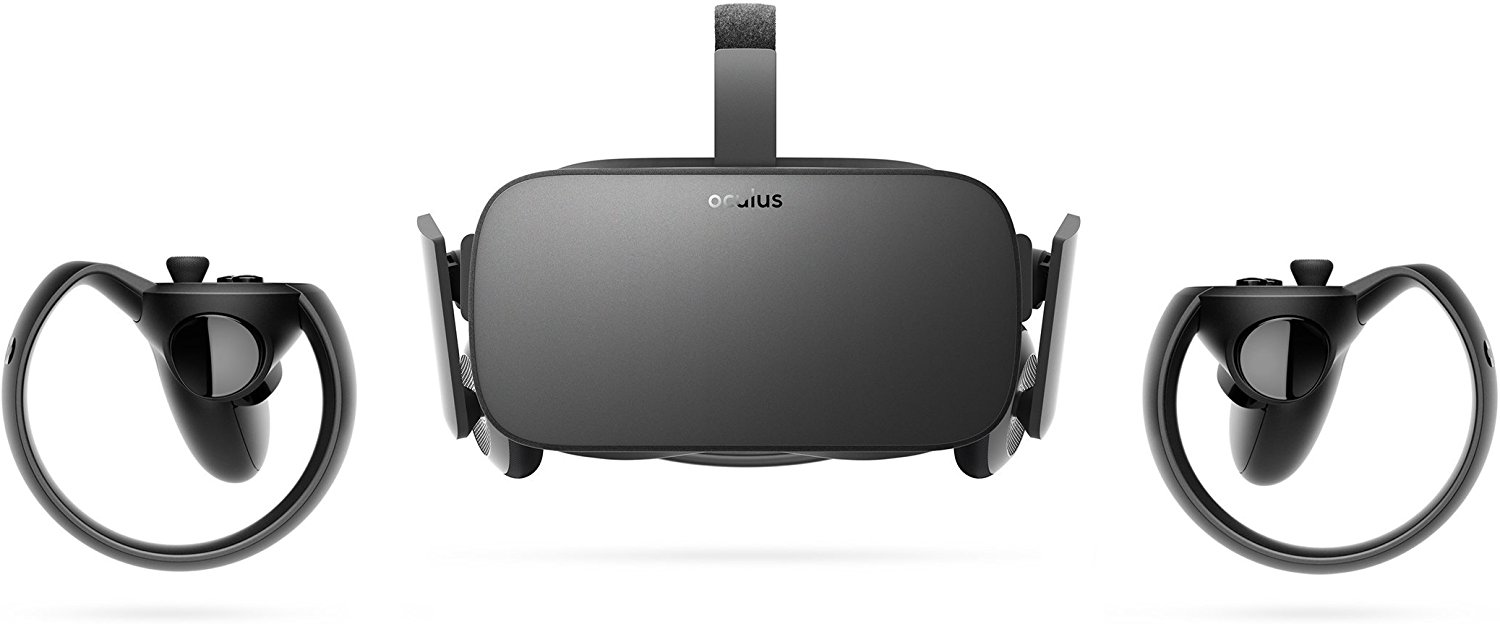
The technology has changed greatly since the original Oculus Rift reached consumers. Modern virtual reality and mixed reality systems can operate as connected business devices with user accounts, applications, cameras, sensors, cloud services, and wireless network access.
That creates new opportunities, but it also creates IT responsibilities. A business should understand the use case, expected return, privacy concerns, device controls, and support requirements before deploying headsets to employees or customers.
What is virtual reality for business?
Virtual reality for business is the use of immersive headsets, software, sensors, and three-dimensional environments to support training, design, collaboration, sales, planning, or customer experiences.
Virtual reality, often called VR, places the user inside a computer-generated environment. Mixed reality can combine digital objects with a view of the physical space. Augmented reality adds digital information to a real-world view.
These technologies are sometimes grouped under the term extended reality, or XR. The exact label matters less than the business goal. A company should begin by asking what task the technology will improve.
For example, a construction company may use an immersive model to review a planned building. A manufacturer may simulate equipment training. A real estate firm may provide a virtual property tour. The headset is only useful when it solves a clear business problem.
What happened to the original Oculus Rift?
The original Oculus Rift helped introduce consumer virtual reality to a wider audience, but the market has moved beyond that first generation of hardware.
Oculus became part of Meta’s broader virtual and mixed reality product strategy. Newer systems may operate without the powerful gaming computer that early Rift models required. They can also include cameras, hand tracking, room mapping, cloud-connected applications, and business management options.
For a business, the important question is no longer whether virtual reality will reach consumers. The better question is whether an immersive system can improve a specific workflow enough to justify its cost and management requirements.
How can small businesses use virtual reality?
Small businesses can use VR for employee training, design reviews, customer demonstrations, remote collaboration, and simulations. The best use cases involve work that is expensive, dangerous, difficult to repeat, or easier to understand in three dimensions.
Employee training and safety simulations
Virtual reality can allow employees to practice a task without using live machinery, occupying a physical training area, or creating the same level of real-world risk.
Possible training scenarios include:
- Equipment operation and maintenance procedures
- Workplace safety and emergency response
- Customer service and communication practice
- Facility orientation for new employees
- Technical procedures that require repeated practice
Manufacturing, aviation, automotive, construction, transportation, and utilities companies may find these simulations especially useful. However, VR training should support established safety procedures rather than replace required hands-on instruction.
Architecture, construction, and design reviews
Immersive models can help teams understand scale, layout, spacing, and movement before a project is built. This can make complex plans easier for clients and nontechnical stakeholders to review.
An architecture firm might let a client walk through a digital model. A construction team might identify access or layout concerns. A manufacturer could review the placement of equipment inside a planned production area.
Finding a design issue early may be less costly than making a physical change after work has started.
Real estate tours and product demonstrations
Virtual tours can help a customer experience a property, product, facility, or planned environment without being physically present.
This may help businesses:
- Show an unfinished property or future development
- Demonstrate large equipment without transporting it
- Present several design options during one meeting
- Reach customers who cannot visit a location
- Create a more interactive trade show presentation
The experience should still be easy to use. A visually impressive demonstration will not help if customers struggle to start the headset, understand the controls, or move safely.
Remote collaboration and virtual workspaces
VR can provide a shared three-dimensional workspace for remote teams. Participants may review models, attend meetings, use virtual displays, or interact with the same digital object.
This may be useful when a normal video meeting cannot clearly communicate the size, position, or movement of an object. It may be less useful for routine conversations that can be handled by email, phone, or video conferencing.
Data visualization and planning
Some organizations use immersive tools to view complex data, digital twins, maps, facilities, and operational information in a spatial format.
A three-dimensional view may help a team understand relationships that are difficult to see in a spreadsheet or flat diagram. The value depends on the quality of the data and whether the immersive view supports a better decision.
Does every business need virtual reality?
No. Virtual reality should solve a defined problem, reduce a measurable cost, improve safety, or create a better customer experience. It should not be purchased only because it appears innovative.
A normal laptop, tablet, video meeting, or web-based training platform may be more affordable and easier to manage for many tasks.
A business should adopt virtual reality when the immersive experience creates a clear advantage over a simpler technology.
Before buying hardware, identify the process that needs improvement. Then compare the VR option with less complex alternatives.
What should a business evaluate before buying VR equipment?
A business should evaluate the use case, software, hardware, support, employee comfort, network needs, security controls, and total cost before purchasing virtual reality equipment.
Define the business result first
Start with a measurable goal. Examples include reducing training travel, shortening onboarding, improving design approval, reducing equipment downtime, or helping customers understand a complex product.
Avoid goals such as “becoming more innovative.” That is difficult to measure and does not explain how the technology will help the business.
Confirm the required application
The software normally determines whether the project succeeds. Confirm that the needed application supports your headset, operating model, number of users, data format, and business workflow.
Ask whether the software requires:
- A separate computer or workstation
- A constant internet connection
- Cloud storage or data synchronization
- Individual user accounts
- A recurring business license
- Custom development or three-dimensional content
Calculate the full cost
The purchase price of the headset is only one part of the project. The business may also need software subscriptions, content creation, powerful computers, accessories, replacement parts, wireless upgrades, user training, device management, and IT support.
| Cost Area | Questions to Ask |
|---|---|
| Hardware | How many headsets, controllers, computers, chargers, and replacement parts are required? |
| Software | Is the license priced per user, device, location, or month? |
| Content | Can existing content be used, or must the experience be designed and updated? |
| Management | How will accounts, updates, applications, settings, and lost devices be managed? |
| Support | Who will help employees when the headset, application, login, or network fails? |
Review accessibility and employee comfort
Not every employee can comfortably use a headset. Some users may experience eye strain, dizziness, motion discomfort, difficulty with controls, or physical accessibility barriers.
Provide another way to complete essential work or training when possible. Sessions should also include clear physical boundaries, suitable breaks, and enough space for safe movement.
What security risks come with business VR headsets?
Business VR headsets can create account, application, network, privacy, and physical security risks. They should be treated as connected endpoints rather than entertainment accessories.
User accounts can be compromised
A headset may be connected to a user account, business application, email address, payment method, cloud service, or administrative portal. A stolen password could allow an attacker to access more than the device itself.
Businesses should use individual accounts, strong passwords, multi-factor authentication, limited administrator access, and a clear offboarding process.
Headsets may collect sensitive sensor data
Immersive systems may use cameras, microphones, movement tracking, hand tracking, room mapping, eye tracking, and other sensors. The exact data depends on the device and application.
The National Institute of Standards and Technology has noted that immersive systems may process detailed spatial, biometric, behavioral, and physical data. This can create privacy concerns that do not appear in the same way on a normal office computer.
Businesses should review the official NIST guidance on cybersecurity and privacy for immersive technologies when evaluating higher-risk deployments.
Unauthorized applications may expose business data
Employees should not install unapproved applications on a business headset. An application may request access to sensors, files, microphones, cameras, contacts, storage, or cloud accounts.
A company should maintain an approved application list and review what each application collects, where the information is stored, and which outside providers receive it.
Wireless connections can expand the network attack surface
A headset connected to company Wi-Fi becomes another device on the network. Weak settings, outdated software, or poor network separation can create avoidable risk.
Depending on the use case, headsets may belong on a separate wireless network or device group. Access should be limited to the systems the headset actually needs.
Shared headsets can expose another user’s information
A shared device may retain login sessions, application history, files, browser data, recordings, or personal settings. The next user should not inherit access to the previous user’s information.
Use managed shared-device settings when available. Sign users out after sessions, restrict stored information, and define how the device will be reset between employees or customers.
Lost or stolen headsets may contain business access
A headset can be left at a client site, event, vehicle, training room, or employee home. Lost-device procedures should cover VR equipment just as they cover laptops and phones.
The company should know who has each device, what accounts are signed in, whether a screen lock is enabled, and whether remote sign-out or device reset is available.
How should a business secure VR devices?
A business should secure VR devices by assigning ownership, controlling accounts and applications, applying updates, protecting the network, limiting stored data, and preparing for lost devices or employee departures.
- Inventory every headset. Record the device model, serial number, assigned user, location, applications, and support status.
- Use business-controlled accounts. Avoid building a company deployment around an employee’s private account.
- Require multi-factor authentication. Protect administrative portals, application accounts, cloud services, and connected email accounts.
- Restrict administrator access. Give users only the permissions required for their role.
- Approve applications before installation. Review permissions, data collection, licensing, and vendor security.
- Apply device and application updates. Do not leave headsets on outdated software because they are used less often than laptops.
- Limit network access. Connect the device only to the business resources it needs.
- Reduce stored information. Avoid saving sensitive files, recordings, passwords, or customer data when they are not required.
- Prepare a lost-device response. Document how to disable accounts, revoke sessions, locate equipment, and reset the headset.
- Include VR in offboarding. Recover assigned equipment and remove employee access when a person leaves the company.
Companies planning an immersive technology deployment should include the headsets, accounts, applications, wireless access, and data flows in their wider security review. Professional IT security services for Atlanta small businesses can help identify how these devices fit into existing endpoint, identity, network, and data protection controls.
Should VR headsets be managed like business computers?
Yes. A business headset should be treated as a managed endpoint because it can connect to networks, run applications, use cloud accounts, receive updates, and process company information.
The management method may be different from a Windows laptop, but the basic responsibilities are similar:
- Know which devices the business owns
- Know which users and accounts have access
- Keep the operating system and applications updated
- Control which applications can be installed
- Protect the device with a passcode or access control
- Remove access when a user changes roles or leaves
- Respond quickly when equipment is lost or compromised
Consumer setup and business deployment are not the same
A single consumer headset can often be configured manually. A business deploying several devices may need centralized account, application, and device management.
Before purchasing a large number of headsets, confirm whether the manufacturer or software provider supports business enrollment, shared-device use, application deployment, device status reporting, access control, and remote reset.
How can a small business test VR before a full rollout?
A small business should begin with a limited pilot that tests one clear use case with a small group of employees. The pilot should measure results before the company purchases more equipment.
- Choose one problem. Select a training, design, sales, or collaboration process that may benefit from immersion.
- Set a measurable goal. Track time, travel cost, employee performance, errors, customer engagement, or another useful result.
- Use a small test group. Include employees with different technical skills and job responsibilities.
- Review security before connecting data. Understand the accounts, applications, permissions, sensors, and cloud services involved.
- Document user feedback. Ask about comfort, usability, accessibility, reliability, and training needs.
- Compare the results. Decide whether VR performed better than the existing method or a simpler alternative.
- Plan support before expansion. Define who will manage accounts, applications, updates, hardware, and user issues.
FAQ about virtual reality for business
Is virtual reality useful for a small business?
Virtual reality can be useful when it improves training, design reviews, product demonstrations, property tours, or complex collaboration. It is less useful when a normal computer, video meeting, or web application can complete the same task at a lower cost.
What industries use virtual reality for work?
VR is used in areas such as manufacturing, construction, architecture, aviation, automotive services, real estate, healthcare training, education, utilities, transportation, product design, and emergency response.
Can VR headsets collect personal information?
Yes. Depending on the device and application, a headset may process account details, audio, movement, hand tracking, room mapping, eye tracking, biometric signals, application activity, and other sensor data. Businesses should review privacy settings and vendor policies before deployment.
Can employees share one business VR headset?
Yes, but the business should use shared-device controls when available. Users should not gain access to another employee’s account, files, history, recordings, or saved application sessions.
Does a VR headset need cybersecurity protection?
Yes. A business headset can connect to Wi-Fi, run applications, use cloud services, store data, and access user accounts. It should be inventoried, updated, monitored, and included in account, network, privacy, and incident response policies.
Plan business VR without creating unmanaged IT risk
Virtual reality has moved far beyond the original consumer launch of the Oculus Rift. It can now support training, design, sales, planning, and collaboration across many industries.
The technology still needs a clear business case. Headsets should also be managed as connected devices with accounts, applications, sensors, software updates, wireless access, and potentially sensitive data.
trueITpros helps Atlanta small businesses evaluate new technology, manage connected devices, strengthen account security, review network access, and create practical IT policies. Contact trueITpros before expanding a VR deployment across your company.
Related Content
- Cybersecurity Risk Assessments for Atlanta SMBs
- The Importance of Endpoint Security for Small Businesses
- Why Software Standardization Matters
To learn more about how trueITpros can help your company with Managed IT Services in Atlanta, contact us at www.trueitpros.com/contact
“`