“`html
Facebook Security for Small Businesses: 9 Key Steps
Facebook security for small businesses is about protecting more than a social media profile. A compromised business Page can expose customer conversations, advertising accounts, payment methods, company contacts, and your brand reputation.
Attackers may use fake login alerts, phishing messages, impersonation accounts, or stolen employee passwords to gain control. Once inside, they may publish scams, change Page access, run unauthorized ads, or contact customers while pretending to represent your company.
The steps below can help your company secure its Facebook Page, manage employee access, reduce privacy risks, and respond faster when suspicious activity appears.
What Does Facebook Security Mean for a Small Business?
Facebook security means controlling who can manage your business Page, protecting every administrator account, limiting the information your company shares, and monitoring for suspicious activity.
A secure business Facebook Page uses multi-factor authentication, limited administrative access, unique passwords, regular access reviews, and a documented recovery plan.
Facebook is often connected to Instagram, Messenger, Meta Business Suite, advertising accounts, customer inquiries, and payment information. A security problem in one employee’s personal account can therefore affect several business assets.
Why Is a Business Facebook Account a Security Risk?
A business Facebook account becomes a security risk when too many people have access, employees share credentials, or the company does not monitor account changes. Attackers know that a trusted Page can be used to reach customers, employees, and business partners.
Common risks include:
- Phishing messages: Fake warnings claim that your Page will be suspended unless you click a link.
- Stolen passwords: A reused password exposed on another website may give an attacker access to Facebook.
- Excessive permissions: Employees, former employees, vendors, and agencies may retain more access than they need.
- Fake business Pages: Impersonators may copy your logo, photos, company name, and contact information.
- Unauthorized advertising: A compromised account may be used to create ads charged to your business.
- Oversharing: Public posts may reveal employee roles, travel plans, internal processes, or details that support targeted scams.
How Can a Small Business Secure Its Facebook Page?
A small business can secure its Facebook Page by protecting administrator accounts, limiting access, reviewing connected assets, and training employees to recognize scams. These controls should be part of normal business operations rather than a one-time setup.
1. Manage the Page Through Meta Business Suite
Use a Meta business portfolio to organize your Facebook Page, Instagram account, advertising account, and employee access. Each person should use an individual account instead of sharing one company login.
Individual access creates clearer accountability. It also allows your company to remove one employee without changing credentials for the entire team.
2. Require Multi-Factor Authentication
Multi-factor authentication adds another verification step when someone signs in from an unfamiliar device or browser. This makes a stolen password less useful to an attacker.
Require MFA for every person with access to your business assets. Authentication apps and security keys can provide stronger protection than relying only on text messages.
Administrators can review current options through the Facebook Security Checkup. Recovery codes should be stored in a secure location that authorized leaders can access during an emergency.
3. Use a Unique Password for Every Account
Every Facebook administrator should use a strong password that is not used for email, banking, cloud software, or any other website. Reusing passwords allows one breach to affect several accounts.
A business password manager can help employees create and store long, unique passwords without writing them down or sending them through email and chat.
4. Give People Only the Access They Need
Not every employee, freelancer, or marketing partner needs full control. Assign the lowest level of access that allows each person to complete their work.
Review access at least once each quarter and whenever an employee changes roles or leaves the company. Remove unused accounts, former agencies, old vendors, and people who no longer manage the Page.
- Keep full-control access limited to a small number of trusted people.
- Use task-based access for employees who only create posts or review messages.
- Remove departing employees as part of the same-day offboarding process.
- Avoid making one person the only administrator with recovery access.
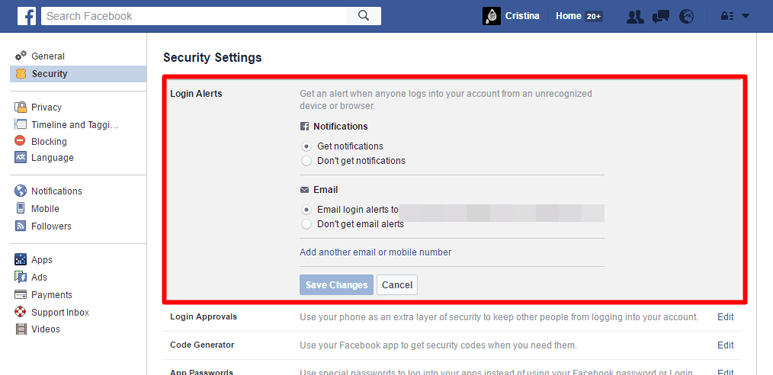
5. Turn On Login Alerts and Review Active Sessions
Login alerts can warn an account owner when Facebook detects access from an unfamiliar device or location. Employees should know how to report an alert they do not recognize.
Administrators should also review active sessions and remove devices they no longer use. An unfamiliar session, unexplained password reset, or unexpected access change should be investigated immediately.
6. Review Connected Apps, Ads, and Payment Methods
Connected applications can retain access to business information after your team stops using them. Remove old social media tools, abandoned integrations, test applications, and vendor connections that are no longer required.
Your company should also review:
- Current advertising campaigns and spending limits
- Stored credit cards and payment methods
- Partner access to advertising accounts
- Connected Instagram accounts and other business assets
- Changes to Page ownership or business portfolio access
7. Create Clear Privacy and Posting Rules
A business Facebook Page is public, so privacy depends largely on what your team chooses to share. Employees should avoid posting information that could help an attacker understand your organization.
Your social media policy should explain what can be posted, who approves sensitive content, and how customer information should be handled. Avoid publicly sharing:
- Employee schedules or detailed travel plans
- Photos showing passwords, badges, computer screens, or access codes
- Customer details without clear permission
- Internal software, security systems, or approval processes
- Information that could help someone answer password recovery questions
8. Train Employees to Recognize Facebook Phishing
Facebook phishing often creates urgency. A message may claim that your Page violated a policy, lost verification, received a copyright complaint, or will be deleted within hours.
Employees should pause before clicking links or providing login information. Teach them to:
- Open Meta Business Suite directly instead of using an unexpected message link.
- Check the full website address before entering a password.
- Never send authentication codes to another person.
- Question messages that demand immediate payment or account verification.
- Report suspicious messages to a manager or IT provider.
The Federal Trade Commission’s phishing guidance provides additional examples of how fraudulent messages attempt to steal account information.
9. Create a Facebook Account Response Plan
A written response plan gives employees clear instructions when an account is compromised, impersonated, or used for unauthorized advertising. The plan should identify who makes decisions and who contacts Meta, customers, financial institutions, and IT support.
Assign an Account Owner
Choose a primary owner and a backup owner for your Meta business assets. Both should understand the recovery process and know where important records are stored.
Preserve Evidence Before Removing It
Take screenshots of fraudulent posts, messages, advertising charges, unfamiliar administrators, login alerts, and fake accounts. Record dates, usernames, links, and transaction details before the content disappears.
Prepare Customer Communication
Create a simple message your company can publish through its website, email system, or other verified channels. It should tell customers what happened, which messages to ignore, and how to contact your real team.
Facebook Business Security Checklist
Use this checklist during a quarterly account review or whenever your company changes employees, agencies, or marketing tools.
| Security Area | What to Check | When to Review |
|---|---|---|
| Administrator access | Remove former employees, vendors, and unused accounts. | Quarterly and after staffing changes |
| Multi-factor authentication | Confirm that every administrator has MFA enabled. | Monthly |
| Active sessions | Remove unfamiliar browsers, phones, and computers. | Monthly or after an alert |
| Advertising | Review campaigns, spending, partners, and payment methods. | Weekly when ads are active |
| Connected applications | Remove integrations your company no longer uses. | Quarterly |
| Recovery plan | Confirm owners, contact details, evidence steps, and recovery codes. | Twice each year |
What Should You Do if a Business Facebook Account Is Hacked?
If your business Facebook account is hacked, secure the affected administrator accounts first, remove unauthorized access, review business assets, and document everything the attacker changed.
Treat a compromised Facebook administrator account as a broader business security incident because the same password, device, or email account may provide access to other systems.
- Use a trusted device to change the affected Facebook password.
- Change the password for the connected email account if compromise is possible.
- Enable or reset multi-factor authentication.
- Sign out unfamiliar devices and active sessions.
- Remove unknown administrators, partners, and connected applications.
- Review posts, messages, ads, payment methods, and account changes.
- Scan the employee’s computer and phone for malware.
- Notify customers if the attacker sent messages or published fraudulent content.
- Use Meta’s hacked account recovery guidance when normal access cannot be restored.
How Do You Report a Fake Facebook Page?
A fake Facebook Page should be documented and reported through Facebook’s impersonation process. Your company should also warn customers through verified channels when the fake Page is actively sending messages or requesting money.
Before submitting a report, save the Page URL, username, screenshots, messages, advertisements, and examples of copied branding. You can then use Meta’s instructions to report a Facebook profile or Page for impersonation.
Continue checking for similar names, altered spellings, copied logos, and accounts that contact customers. One removed account does not always mean the impersonation campaign has ended.
When Does Facebook Security Become a Broader IT Issue?
Facebook security becomes a broader IT issue when the incident involves company email, employee devices, reused passwords, malware, financial information, or access to other cloud platforms.
For example, an attacker who controls an employee’s email may reset passwords for Facebook and other business applications. A malicious browser extension or infected computer could also capture credentials even after a password is changed.
Companies that lack internal resources to manage account access, employee devices, phishing risks, and incident response may need ongoing small business IT security support. The goal is to protect the systems connected to Facebook, not only the Facebook Page itself.
Frequently Asked Questions About Facebook Business Security
Should every Facebook Page administrator use multi-factor authentication?
Yes. Every person who can manage the Page, business portfolio, advertising account, or payment settings should use multi-factor authentication. One unprotected administrator can create an opening for an attacker.
How many people should have full control of a business Facebook Page?
Full control should be limited to a small number of trusted people. Keep at least two properly secured owners for recovery, but give everyone else only the task access required for their role.
How often should a company review Facebook Page access?
Review Facebook Page access at least once each quarter. Access should also be checked immediately after an employee leaves, a vendor relationship ends, or suspicious activity is reported.
Can someone hack a Facebook Page through an employee account?
Yes. Business Page access is connected to individual user accounts. If an authorized employee’s account is compromised, the attacker may be able to manage the Page and other assigned business assets.
What are common signs that a Facebook business account was compromised?
Common signs include unknown posts, changed Page details, new administrators, unfamiliar login alerts, unauthorized ads, unexpected charges, password reset messages, and customers receiving unusual requests from your Page.
Protect Your Facebook Page and the Systems Behind It
A business Facebook Page should be managed with the same care as email, cloud software, and other important company accounts. Strong authentication, controlled access, employee training, and regular reviews can reduce the risk of impersonation, account theft, unauthorized advertising, and customer scams.
trueITpros helps Atlanta small businesses protect employee accounts, devices, cloud platforms, networks, and daily operations. Contact trueITpros when your company needs practical guidance, responsive IT support, or help investigating suspicious account activity.
To learn more about how trueITpros can help your company with Managed IT Services in Atlanta, contact us at www.trueitpros.com/contact
Related Content
- How to Secure Your Business Social Media Accounts
- How Social Media Oversharing Creates Business Risk
- Spear Phishing Attacks Every Atlanta SMB Should Know
“`